






How to clean walkie talkies safely? How do you stop batteries from dying mid-shift? Proper two way radio maintenance is the only way to protect your investment. This guide covers essential walkie talkie care routines to maximize your system's lifespan and reliability.
The Safe Way to Clean Two Way Radio Equipment
Daily grime builds up on your devices quickly. Proper cleaning prevents button failures and audio issues. However, using the wrong methods will cause permanent damage.
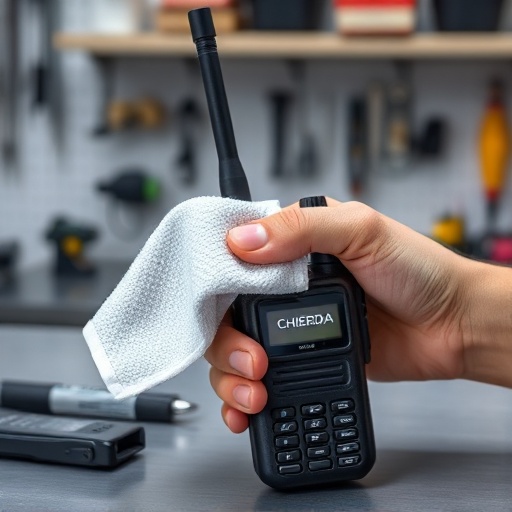
Wiping Down the Housing and Screen: Microfiber is Your Friend
Always turn off the radio and remove the battery before cleaning. Use a soft, dry microfiber cloth to wipe down the exterior. A microfiber cloth grabs dust without scratching the LCD screen. If the radio is very dirty, slightly dampen the cloth with clean water. Never spray water directly onto the radio.
The Critical Step: Cleaning Battery Contacts and Audio Accessory Ports
Dirt on the battery contacts causes power failures. Use a clean, dry cotton swab to gently brush the golden metal contacts on the radio and the battery. Do the same for the audio accessory ports. Clear communication requires clean metal connections.
What to Avoid: Why Harsh Solvents and Compressed Air Damage Radios
Never use bleach, industrial solvents, or heavy detergents on your radio. These harsh chemicals melt the protective rubber seals and degrade the plastic housing. Furthermore, avoid using high-pressure compressed air. Compressed air forces fine dust and moisture deep into the microphone and speaker grills, destroying the internal electronics.
Battery Care 101: How to Extend Radio Battery Life
Batteries are the most frequently replaced parts of any radio system. How to extend radio battery life? You must change how your team charges their devices.
The "Overcharging" Rule: Don't Use the Charger as a Radio Stand
This is the most common mistake in walkie talkie care. Many users leave their radios in the charging cradle all day. This constant "trickle charge" generates heat and severely degrades modern lithium-ion batteries. Only put the radio in the charger when the battery is actually low. Remove it immediately when the light turns green.
Initializing the Power: Best Practices for New Li-Ion Batteries
When you buy new equipment, the batteries need initialization. Charge brand new lithium-ion batteries for a full 12 to 14 hours before their first use. This simple step calibrates the battery cells and ensures maximum capacity for future shifts.
Long-Term Storage: How to Store Batteries When Not in Use
If you store radios for weeks or months, never store them with empty or fully charged batteries. Discharge the batteries to about 50% capacity. Remove the batteries from the radios entirely. Store them in a cool, dry place to prevent chemical degradation.
Proper Storage and Environmental Protection
Your daily storage environment greatly affects your equipment's longevity. Poor radio fleet management leads to broken antennas and cracked screens.
Extreme Heat and Cold: Protecting LCD Screens and Internal Circuits
Never leave radios baking in a hot vehicle or freezing in an unheated shed overnight. Extreme heat destroys LCD screens and warps the plastic housing. Freezing temperatures permanently damage battery chemistry. Always store your equipment at moderate room temperatures.
Best Practices for Radio Fleet Management and Charging Stations
Organize your charging area. Use professional instead of messy individual wall plugs. A dedicated charging station keeps radios safe from accidental drops and makes daily inventory checks much easier for managers.
The Monthly Preventive Maintenance Checklist
Why is my radio button sticking? It happens because teams ignore routine inspections. A monthly maintenance check prevents small issues from becoming expensive repairs.
Inspecting Antennas for Cracks, Bends, and Secure Connections
Check every antenna in your fleet. An antenna with a cracked rubber coating or a bent core severely reduces your transmission range. Ensure every antenna is screwed on tightly. Operating a radio with a loose or broken antenna will fry the internal transmitter board.
Checking Belt Clips, Knobs, and PTT Button Functionality
Inspect the physical hardware. Tighten loose belt clips to prevent radios from falling onto concrete floors. Rotate the volume knobs to ensure smooth operation. Press the PTT button to feel for any sticky resistance. Clean around sticking buttons with a dry brush immediately.
Reliability Requires Routine: Keep Your Comms Ready for Action
Reliable communication saves lives and drives productivity. Consistent two way radio maintenance guarantees your equipment answers the call when you press the button. Build these simple cleaning and charging habits into your daily workflow. Partnering with an experienced ensures you have reliable hardware, but proper care is in your hands.
FAQ: Common Walkie Talkie Care Questions
Can I use alcohol wipes to disinfect my shared walkie-talkies? Yes, you can use a wipe with a mild concentration of isopropyl alcohol (70% or less) to gently disinfect the outer plastic housing. Do not let alcohol drip into the speaker grill, microphone hole, or battery contacts.
How do I clean an IP67 waterproof radio after it gets muddy? If you have a certified IP67 radio, ensure the battery is securely locked and the accessory port cover is tightly closed. You can then rinse the mud off the radio under a gentle stream of clean tap water. Dry it thoroughly with a towel afterward.
Should I fully drain my lithium-ion battery before recharging it? No. Modern lithium-ion batteries do not suffer from "memory effect" like older NiMH batteries. In fact, fully draining a lithium-ion battery frequently will shorten its lifespan. Charge it when it drops to about 20%.
How do I know when it's finally time to replace the radio battery? If your radio dies after only a few hours of use, or if the battery pack feels physically swollen or unusually hot during charging, it is dead. Dispose of it safely and invest in fresh, high-quality